Explorium docs home page
Search...
⌘K
Ask AI
Login
Sign Up
Sign Up
Search...
Navigation
ExactInsights: Viewing The Integration Actions Log
API Reference
Explorium MCP
Integrations
Contact Us
Blog
Explorium AgentSource
Quick Starts
Authentication & Setup
Businesses
Prospects
Webhooks: Receiving Real-Time Events
Pagination
Error Handling
Rate Limit
Credits
Support & Help Center
Additional Resources
Data Catalog
Partners
Outreach users: Getting Your API key
ExactInsights: Viewing The Integration Actions Log
Copy page
To view the log of exports into salesforce
Copy page
1
Click on “CRM Integrations” in your profile menu.
2
Navigate to “Integrations Activity Log” in the CRM Integrations screen.
3
Each Export activity will be logged, noting the user, time, number of process rows and overall status of the export.
4
Export status:
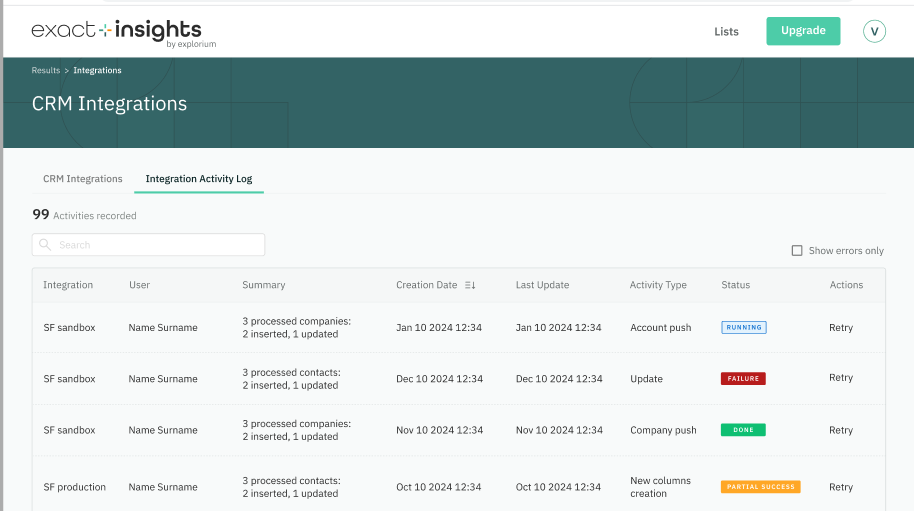
“Running” - Export is in progress
“Done” - All records were exported successfully
“Partial Success” - Some of the records were exported successfully. Click to view error details.
“Failed” - None of the records were exported. Click to view more details about the errors.
Was this page helpful?
Yes
No
⌘I
Assistant
Responses are generated using AI and may contain mistakes.