> ## Documentation Index
> Fetch the complete documentation index at: https://developers.explorium.ai/llms.txt
> Use this file to discover all available pages before exploring further.
# Explorium Event Triggered Outreach
> Automatically identify meaningful events such as product launches, new office opening and much more, enrich company & prospect data, and generate fully personalized outbound emails using Explorium MCP and LLM agents
This n8n and agent-based workflow automates outbound prospecting by monitoring Explorium event data (e.g. product launches, new office opening, new investment and [more](/reference/businesses/events/types/ipo-announcement)), researching companies, identifying key contacts, and generating tailored sales emails leveraging the Explorium MCP server.
## Template
Download the following json file and import it to a new n8n workflow:
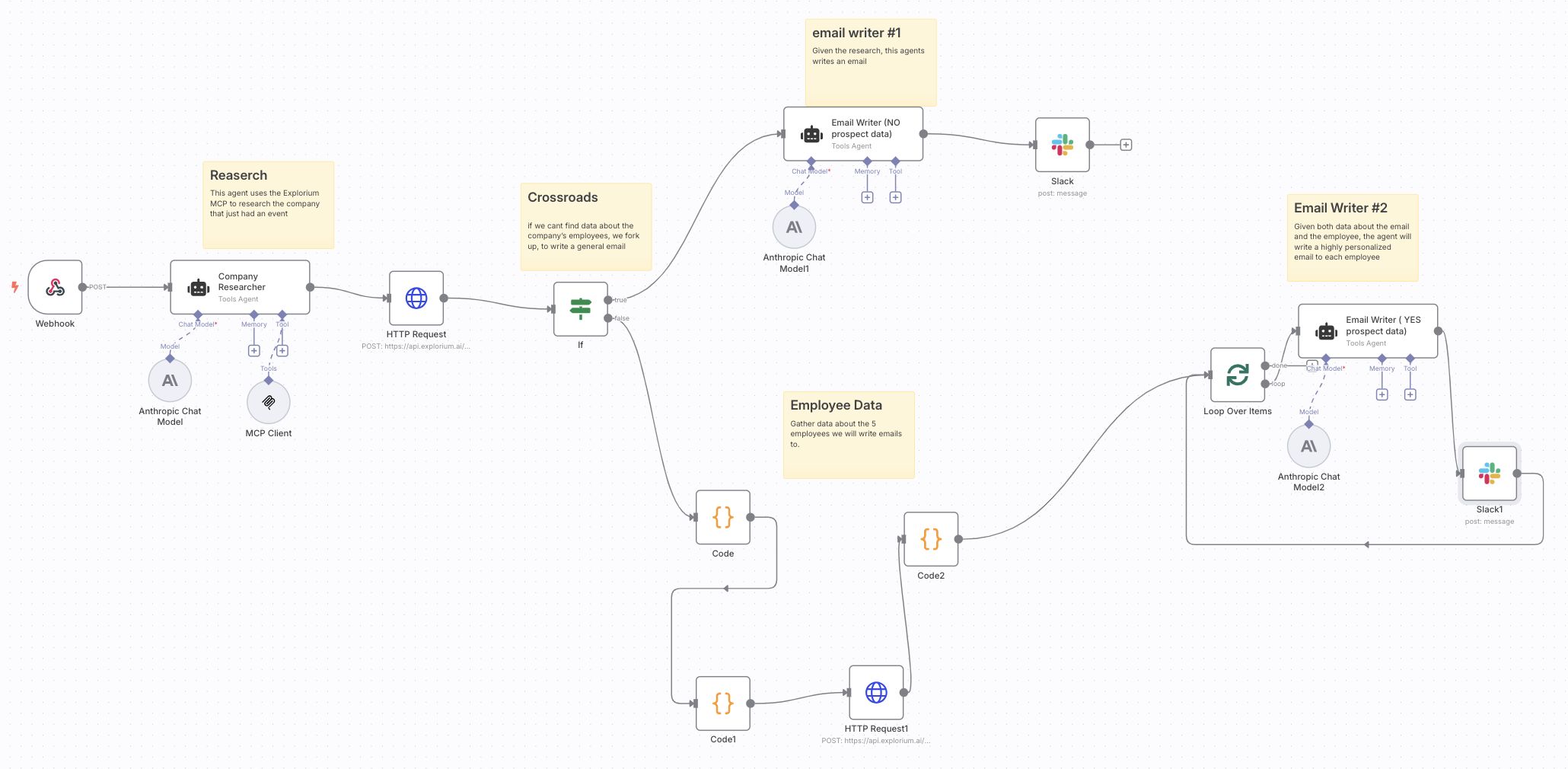 ## Workflow Overview
### Node 1: Webhook Trigger
**Purpose:** Listens for real-time product launch events pushed from Explorium's webhook system.
**How it works:**
* Explorium sends HTTP POST requests containing event data
* The webhook payload includes company name, business ID, domain, product name, and event type
* Pay attention: Product launch is just one example. You can easily enroll to many more meaningful events.
to learn about events and how to enroll to events, visit the events [documentation](/reference/webhooks).
### Node 2: Company Research Agent
**Agent Type:** Tools Agent
**Purpose:** Enrich company data after an event occurs.
**How it works:**
* Uses Explorium MCP via the MCP Client tool to gather additional company data
* Uses Anthropic Claude (Chat Model) to process and interpret company information for downstream personalization
### Node 3: Employee Data Retrieval
**Purpose:** Retrieve prospect-level data for targeting.
**How it works:**
* Uses HTTP Request node to call Explorium's `fetch_prospects` endpoint
* Filters prospects by:
* Company `business_id`
* Departments: Product, R\&D, etc...
* Seniority levels: owner, cxo, vp, director, senior, manager, partner, etc...
* Pay Attention: Follow our fetch prospect [documentation](/reference/prospects/fetch_prospects) for the full list of filter and best practice.
* Limits results to top 5 relevant employees
* Code nodes handle:
* Filtering logic
* Cleaning API response
* Formatting data for downstream agents
### Node 4: Conditional Branch - Prospect Data Check
**If Node:** Checks whether prospect data was successfully retrieved
**Logic:**
* If prospects found personalized emails per person
* If no prospects fallback to company-level general email
### Node 5A: Email Writer #1 (No Prospect Data)
**Agent Type:** Tools Agent
**Purpose:** Write generic outbound email using only company-level research and event info.
**Powered by:** Anthropic Chat Model
### Node 5B: Loop Over Prospects Email Writer #2 (Personalized)
**Agent Type:** Tools Agent
**Purpose:** Write highly personalized email for each identified employee.
**How it works:**
* Loops through each individual prospect
* Passes company research + employee data to LLM agent
* Generates customized emails referencing:
* Prospect's title & department
* Product launch
* Role-relevant Explorium value proposition
### Node 6: Slack Notifications
**Purpose:** Posts completed emails to internal Slack channel for review or testing before final deployment.
**Future State:** Can be swapped with an email sequencing platform in production.
## Setup Requirements
### Explorium API Access
* MCP Client credentials for company enrichment and prospect fetching
* Registered webhook for event listening
### n8n Configuration
* Secure environment variables for API keys & webhook secret
* Code nodes configured for JSON transformation, filtering & signature validation
## Customization Options
### Personalization Logic
* Update LLM prompt instructions to reflect ICP priorities
* Modify email templates based on role, department, or tenure logic
* Adjust fallback behavior when prospect data is unavailable
### API Request Tuning
* Adjust `page_size` for number of prospects retrieved
* Fine-tune seniority and department filters to match evolving targeting
## Future Expansion
* Swap Slack notifications for outbound email automation
* Integrate call task assignment directly into CRM
* Introduce engagement scoring feedback loop (opens, clicks, replies)
## Troubleshooting Tips
* Validate webhook signature matching to prevent unauthorized requests
* Ensure correct `business_id` is passed to prospect fetching endpoint
* Confirm business enrichment returns sufficient data for company researcher agents
* Review agent LLM responses for correct output structure and parsing consistency
## Workflow Overview
### Node 1: Webhook Trigger
**Purpose:** Listens for real-time product launch events pushed from Explorium's webhook system.
**How it works:**
* Explorium sends HTTP POST requests containing event data
* The webhook payload includes company name, business ID, domain, product name, and event type
* Pay attention: Product launch is just one example. You can easily enroll to many more meaningful events.
to learn about events and how to enroll to events, visit the events [documentation](/reference/webhooks).
### Node 2: Company Research Agent
**Agent Type:** Tools Agent
**Purpose:** Enrich company data after an event occurs.
**How it works:**
* Uses Explorium MCP via the MCP Client tool to gather additional company data
* Uses Anthropic Claude (Chat Model) to process and interpret company information for downstream personalization
### Node 3: Employee Data Retrieval
**Purpose:** Retrieve prospect-level data for targeting.
**How it works:**
* Uses HTTP Request node to call Explorium's `fetch_prospects` endpoint
* Filters prospects by:
* Company `business_id`
* Departments: Product, R\&D, etc...
* Seniority levels: owner, cxo, vp, director, senior, manager, partner, etc...
* Pay Attention: Follow our fetch prospect [documentation](/reference/prospects/fetch_prospects) for the full list of filter and best practice.
* Limits results to top 5 relevant employees
* Code nodes handle:
* Filtering logic
* Cleaning API response
* Formatting data for downstream agents
### Node 4: Conditional Branch - Prospect Data Check
**If Node:** Checks whether prospect data was successfully retrieved
**Logic:**
* If prospects found personalized emails per person
* If no prospects fallback to company-level general email
### Node 5A: Email Writer #1 (No Prospect Data)
**Agent Type:** Tools Agent
**Purpose:** Write generic outbound email using only company-level research and event info.
**Powered by:** Anthropic Chat Model
### Node 5B: Loop Over Prospects Email Writer #2 (Personalized)
**Agent Type:** Tools Agent
**Purpose:** Write highly personalized email for each identified employee.
**How it works:**
* Loops through each individual prospect
* Passes company research + employee data to LLM agent
* Generates customized emails referencing:
* Prospect's title & department
* Product launch
* Role-relevant Explorium value proposition
### Node 6: Slack Notifications
**Purpose:** Posts completed emails to internal Slack channel for review or testing before final deployment.
**Future State:** Can be swapped with an email sequencing platform in production.
## Setup Requirements
### Explorium API Access
* MCP Client credentials for company enrichment and prospect fetching
* Registered webhook for event listening
### n8n Configuration
* Secure environment variables for API keys & webhook secret
* Code nodes configured for JSON transformation, filtering & signature validation
## Customization Options
### Personalization Logic
* Update LLM prompt instructions to reflect ICP priorities
* Modify email templates based on role, department, or tenure logic
* Adjust fallback behavior when prospect data is unavailable
### API Request Tuning
* Adjust `page_size` for number of prospects retrieved
* Fine-tune seniority and department filters to match evolving targeting
## Future Expansion
* Swap Slack notifications for outbound email automation
* Integrate call task assignment directly into CRM
* Introduce engagement scoring feedback loop (opens, clicks, replies)
## Troubleshooting Tips
* Validate webhook signature matching to prevent unauthorized requests
* Ensure correct `business_id` is passed to prospect fetching endpoint
* Confirm business enrichment returns sufficient data for company researcher agents
* Review agent LLM responses for correct output structure and parsing consistency