> ## Documentation Index
> Fetch the complete documentation index at: https://developers.explorium.ai/llms.txt
> Use this file to discover all available pages before exploring further.
# User Management
## Overview
Managing users within your Explorium account ensures that the right people have the correct access levels. Admin users can invite new users, assign roles, and remove access when needed, maintaining control over API and services.
**Why is this important?**
* Ensures **secure and organized** access to the services.
* Allows businesses to **assign roles** according to responsibilities.
* Provides visibility into **who is using the system** and their actions.
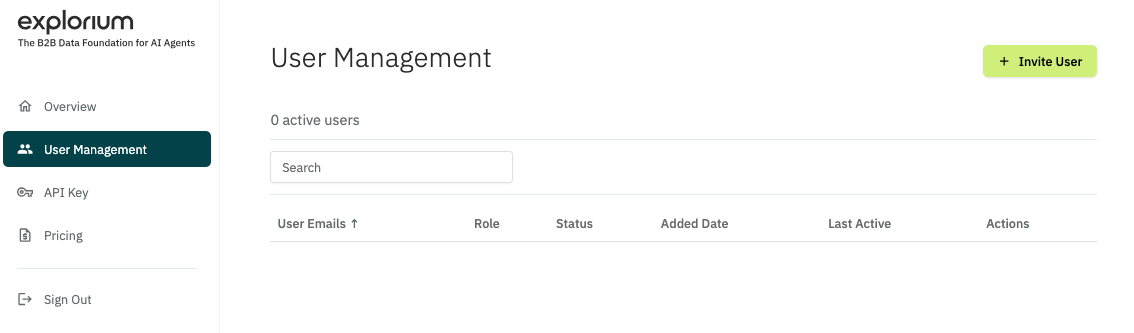 ## User Management Actions
### Invite a New User
Click the **"Invite User"** button.
Enter the **email address** of the new user.
Click **"Send Invitation"** – the user will receive an email with instructions to join.
**Note:**
Only Admin users can invite new members.
### Promote a User to Admin
Find the user in the list.
Click the **Actions menu (⋮)** next to their name.
Select **"Make Admin"** – this grants admin privileges.
### Remove a User
Click the **Actions menu (⋮)** next to their name.
Select **"Delete"** – this revokes their access immediately.
### Monitor User Activity
* View **last active timestamps** to track engagement.
**Tip:**
Regularly audit user access to ensure security compliance.
## User Management Actions
### Invite a New User
Click the **"Invite User"** button.
Enter the **email address** of the new user.
Click **"Send Invitation"** – the user will receive an email with instructions to join.
**Note:**
Only Admin users can invite new members.
### Promote a User to Admin
Find the user in the list.
Click the **Actions menu (⋮)** next to their name.
Select **"Make Admin"** – this grants admin privileges.
### Remove a User
Click the **Actions menu (⋮)** next to their name.
Select **"Delete"** – this revokes their access immediately.
### Monitor User Activity
* View **last active timestamps** to track engagement.
**Tip:**
Regularly audit user access to ensure security compliance.